


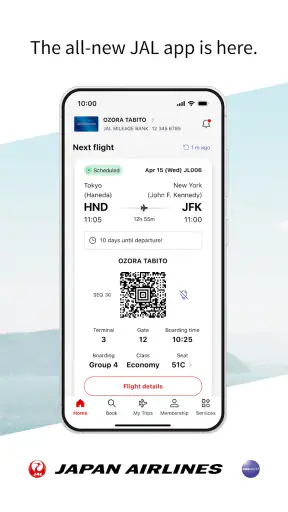
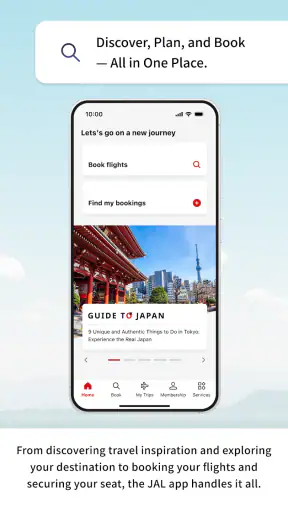
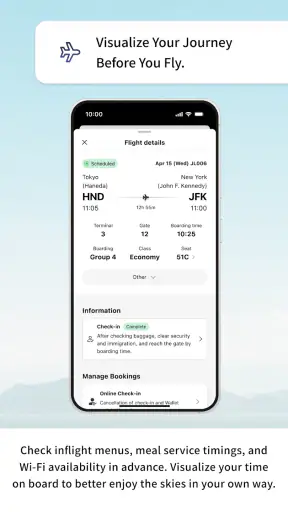
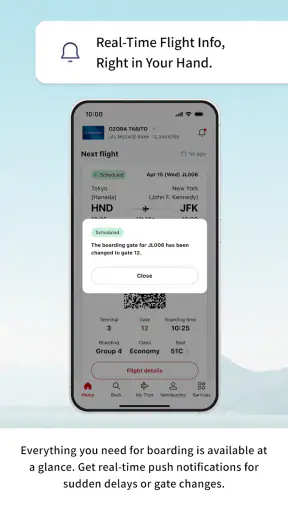
When I travel with other people, the difficult part is rarely finding a flight. It is keeping everyone aligned on the same booking, timing, airport details, and last-minute changes without turning one person into a permanent message relay. I tested the Japan Airlines app with that shared-travel problem in mind, and I found it most useful as a personal travel companion that can also support a household or group when everyone understands where the account boundaries are.
Japan Airlines Co.,Ltd. publishes this free Travel & Local app for Android and iOS. It is suitable for Everyone, and its long presence is reflected in a release history going back to Dec 21, 2010. The current version is 6.4.0, and the app requires OS 11 or later. Those details matter in a shared home because an older phone may not be ready for the current experience, even when the traveler using it is perfectly comfortable with other apps.
The app has a 4.6 average from around 53 thousand ratings and has passed one million installs. I would not treat those figures as a guarantee that every traveler will enjoy it, but they do suggest that it is a well-established choice for people dealing with Japan Airlines journeys. My overall impression is positive: it is more useful than relying only on a browser, but it is not a universal trip-management tool for an entire household.
Using one travel app across a shared household
A realistic example is a family preparing for a trip where one adult makes the booking, another adult handles airport transport, and a teenager needs to know when to be ready. In that situation, the app works best when each person uses it for a clearly defined purpose. The booking holder can keep the main travel information close at hand, while another traveler can use the official Japan Airlines app for their own journey-related checks rather than depending entirely on screenshots in a group chat.
I like this approach because travel information changes context as the departure gets closer. A message sent several days earlier can be buried under ordinary conversation, while an airline app is a more natural place to check the trip again. It also reduces the chance that someone is reading an old screenshot with a detail that has since changed. The important habit is to make the app part of the household routine, not to assume that installing it automatically creates a shared dashboard.
That distinction is easy to miss. A shared phone can be convenient for the person organizing the trip, but it can also blur whose reservation or travel details are currently being viewed. If several people take turns using the same device, I would check the active account and displayed journey before making any decision based on the screen. For a family, this simple pause is more valuable than trying to make one login serve every traveler.
The strongest household workflow is “one traveler, one clear responsibility,” not “one account for everyone.” The person managing the reservation can use the app as the main reference, while other travelers confirm their own information through the appropriate access available to them. This keeps coordination practical without pretending that an airline app replaces a family calendar, a group chat, or a shared checklist.
What to do before handing the phone to someone else
Before passing a device to a partner or child, I would close the current travel screen and make sure the next person knows whether they are looking at their own journey or helping with someone else’s. This is especially sensible when the phone is used for several household members. Airline information is personal enough that casual account switching can create confusion, even when everyone in the home trusts one another.
I would also avoid treating a saved screen as the final word. If a relative asks, “What time are we leaving?” I would open the relevant journey again rather than quote a detail remembered from an earlier check. That workflow takes only a moment and is safer than forwarding a chain of old images. The app is most valuable when it becomes the place where the organizer verifies information immediately before sharing it.
For a shared-device setup, the practical boundary is simple: the app helps you access Japan Airlines information, but the household still needs its own rules for who checks, who communicates, and who makes decisions. I found that clarity prevents more mistakes than installing the app on every available phone.
Setup, account boundaries, and everyday coordination
Getting started is straightforward in principle: install the app on a compatible device, open it, and use the access that matches your travel situation. The important part is not speed but accuracy. I would keep the traveler’s name, reservation information, and any required details nearby while setting things up, because a small mismatch can be more frustrating to diagnose when several people are helping at once.
If one adult is arranging travel for the household, I recommend deciding in advance whether that person will remain the main organizer or whether each traveler will manage their own side. The first option is simpler for a young family or a group that wants one coordinator. The second gives adults more independence and avoids making one person responsible for every question. The app can support either style as long as the household does not confuse shared planning with shared credentials.
There is also a useful difference between a booking organizer and a device owner. The person who paid for or arranged a journey may be using another family member’s phone, perhaps because that device has a better battery or a more reliable connection. In that case, I would treat the phone as temporary equipment and remove the travel view from the handoff process when finished. That is a small privacy-minded habit, but it also prevents the next user from opening the app and assuming the displayed trip belongs to them.
For a couple traveling together, I would choose one person to perform the final check and send a short summary to the other: airport, date, departure time, and any action that still needs attention. The app remains the source for checking the journey, while the message becomes a concise coordination note. This is better than asking both people to interpret every screen independently, especially when one traveler is busy with luggage, children, or transport arrangements.
With children, I would keep the explanation age-appropriate. A younger child may only need to know that the app belongs to the airline and that an adult will handle account details. An older teenager can use it as a way to understand the plan, but I would still explain which information is theirs to check and which decisions remain with the adult organizer. The Everyone age rating makes the app broadly accessible, but an age label is not the same thing as independent travel readiness.
Where the app helps more than a browser
The main advantage over repeatedly searching the web is continuity. A browser is excellent when I need general information or want to compare options across airlines, but an official airline app feels more focused once the trip is already connected to Japan Airlines. I am less likely to begin with a general search, open several results, and wonder whether I am looking at the right airline page or an outdated discussion.
That does not make the app a replacement for every travel tool. For comparing fares, looking at competing carriers, planning ground transport, or organizing hotels, I would still use broader travel services or the relevant local apps. The JAL app is the better choice when the question is specifically about a Japan Airlines journey and I want a direct place to revisit it. It is not the best single screen for an entire multi-airline itinerary.
This limitation becomes important in shared households. If one traveler is flying Japan Airlines while another is taking a different carrier, a family calendar or itinerary organizer may provide the clearer group view. I would keep the JAL app for the JAL portion and use a neutral household tool for the complete schedule. Trying to force one airline app to coordinate every leg can make the overall plan harder to read.
Another practical trade-off is dependence on the phone. A household that relies heavily on the app should still keep essential travel details available in a second form, such as a written note or a carefully organized message. I am not suggesting that the app is unreliable; rather, phones run low on power, get misplaced, or end up with the wrong person during a busy airport transfer. Good travel preparation includes a fallback even when the official app is convenient.
Coordination when plans become stressful
The most useful test is not a quiet evening at home but a rushed morning. Imagine one parent preparing bags, another arranging transport, and a child asking when everyone needs to leave. I would open the app to verify the Japan Airlines journey, write the key details in the household chat, and assign one person to check the app again closer to departure. That creates a clear chain of responsibility instead of five people sending guesses.
If the group separates at the airport, the organizer can share the information needed for the next meeting point while each adult keeps their own phone available. I prefer this to passing one device around, because the person carrying the phone may be dealing with luggage or a child at exactly the moment someone else wants to check the plan. A shared itinerary is useful, but shared physical access to one screen is not always efficient.
For older relatives, I would prepare the app with them before the travel day rather than introducing it in a queue. Show them where to look, explain which journey is theirs, and make sure they know whom to ask if they are unsure. The goal is confidence, not technical training. If they find the app more complicated than a printed summary, the printed summary may be the better companion, with the app kept by the organizer for verification.
For a group of friends, the same principle applies but the boundaries are different. Friends may not want one person to hold everyone’s travel information, and they may have separate bookings. I would use the app individually and agree on a shared meeting plan outside it. That keeps personal access separate while still giving the group a reliable way to coordinate departure and arrival arrangements.
Age, trust, and the limits of shared access
The Everyone rating is reassuring for households that want a broadly accessible airline app, but I would not interpret it as permission for every child to manage travel independently. The app can be part of a young traveler’s preparation without becoming the person responsible for the booking. An adult should decide how much access is appropriate, especially when the device is shared or when the trip includes several travelers.
Trust also has a practical side. If a partner asks me to check a journey on their behalf, I would confirm exactly what they want checked before opening anything. If a teenager borrows my phone, I would avoid leaving an account open after the task is complete. These are ordinary boundaries, not signs of suspicion. Travel apps bring together information that can affect a whole household, so clear habits protect both privacy and accuracy.
I would be particularly careful in multigenerational households. A grandparent may appreciate having the official airline app available, while a younger family member may be better at navigating it. The best arrangement is often assisted use: the younger person helps locate the information, and the traveler confirms that it applies to their own journey. This avoids making technical confidence the same thing as decision-making authority.
There is no benefit in installing the app on every family phone merely for appearances. If a person will not use it, a concise message from the organizer may be enough. If a traveler wants direct access, their own device and clearly separated travel information are preferable. I found that fewer, better-defined users create less confusion than a household full of duplicate logins and uncertain responsibility.
Who should choose another approach
I would skip relying on this app as the main planning tool if my trip involved several airlines, complicated rail connections, or a large group with constantly changing arrangements. In that case, a general itinerary manager or shared calendar would give me a better complete picture, while the JAL app would remain useful for the Japan Airlines segment. The official app is focused, and that focus is a strength until the itinerary becomes broader than the airline itself.
I would also hesitate to make it the only resource for someone who is uncomfortable with smartphones, has limited access to a compatible device, or is likely to hand the phone to someone else during the journey. The solution is not necessarily abandoning the app; it is pairing it with a human organizer and a simple written plan. A tool should reduce stress, not become another task that the least confident traveler must master alone.
Frequent Japan Airlines travelers are likely to get more value than someone who is only comparing flights. The official connection can save repeated searching and make airline-specific checking feel more direct. Occasional travelers may still appreciate that convenience, but they should not expect the app to organize hotels, local transport, or every part of a family holiday.
My household verdict after using it
I see the Japan Airlines app as a focused, sensible companion for travelers who want a direct way to stay connected with their Japan Airlines journey. Its free price removes an obvious barrier, and the broad Everyone rating makes it suitable for mixed-age households when adults set sensible boundaries. The established user base and 4.6 average also make it feel like a dependable mainstream choice rather than an experimental travel utility.
My recommendation is strongest for the person who usually organizes flights and wants to replace scattered browser tabs or buried messages with one official app. It is also a good fit for couples who share responsibility but can agree on who performs the final check. For families, I would use it alongside a group chat or calendar, not instead of one. The app can verify the airline part of the plan; the household still needs a clear way to coordinate people.
The most important setup decision is deciding whose information is being viewed and who is responsible for acting on it. Once that boundary is clear, the app becomes easier to use on a shared device, easier to explain to relatives, and less likely to create confusion when several travelers are involved. I would keep the account access personal, use messages for concise coordination, and maintain a backup note for the essential journey details.
In my experience, Japan Airlines succeeds because it stays close to the airline journey instead of trying to become a complete family travel organizer. That focus means it will not suit every itinerary, but it gives Japan Airlines passengers a practical official starting point. If your household has a Japan Airlines trip ahead and someone is willing to coordinate the setup, I think it is worth installing on a supported device and making it part of the travel routine.


